Download the certificate from the official account
A GST registration certificate is a key reference for the approved registration's identity and particulars. Obtain the PDF through the official GST account rather than relying only on a cropped image forwarded by a preparer. GSTN's My Profile guidance provides a registration-certificate link and explains that the certificate is downloaded in PDF format.
Save the original downloaded file with the application and approval records. Keep an accessible working copy for legitimate business needs, while controlling unnecessary circulation of personal annexure details. A clean certificate file is useful for customer onboarding, but the public-facing main details and sensitive individual information should not be shared indiscriminately.
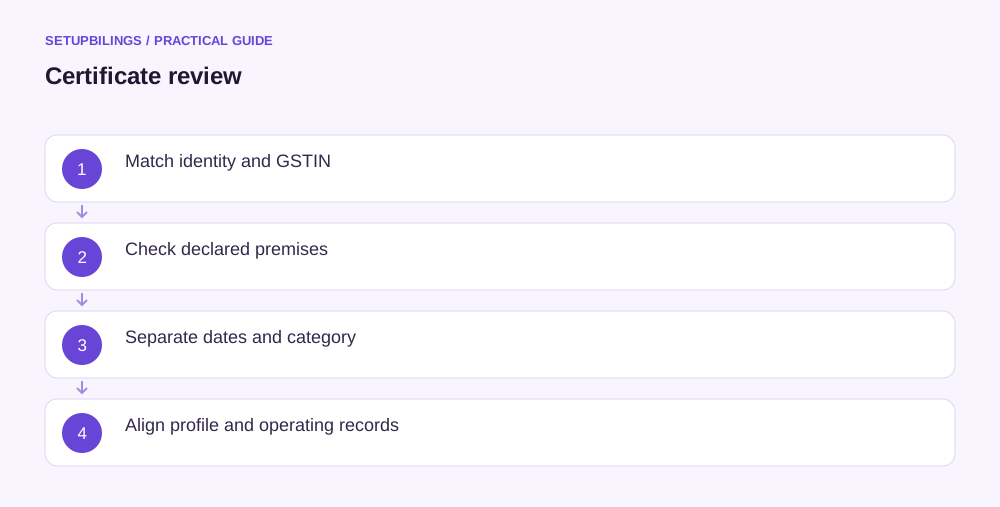
Verify the registrant and GSTIN
Compare the legal name with the PAN-based applicant identity. Check the trade name separately, since it may legitimately differ. A correct-looking brand name cannot compensate for a certificate issued to the wrong legal person. The proprietor's PAN and a company's PAN are not interchangeable because the owner runs both businesses.
Review the GSTIN carefully before copying it into invoice software. Confirm the State and the PAN portion against the source records. Do not correct an unexpected digit by manually editing the PDF. If the certificate or profile appears inconsistent, investigate through the appropriate official process and preserve the original evidence.
GSTIN structure checking is only one part of the review. A number can have a plausible length and format while belonging to another taxpayer. Check the registration details through the official search or profile as appropriate. Historical copies should be distinguished from the current account status, especially after amendments, suspension or cancellation.
Check principal and additional locations
Read the principal address field by field: floor, building or unit, road, locality, city, district, State and PIN. Compare it with the submitted premises evidence and actual location. GSTN's current guidance describes a revised address sequence in newly generated certificates, so a format difference should be assessed for meaning rather than assumed to be an error.
Review the additional-place annexure and confirm all relevant locations appear as intended. A warehouse mistakenly omitted from the application will not be fixed merely because the accounts team adds it to a dispatch spreadsheet. Conversely, a location entered in error should not remain in the profile simply because it appears on an approved certificate.
Illustratively, a Rajkot engineering supplier finds its workshop address correct but an additional warehouse listed as “Plot 18” instead of “Plot 81.” It should compare the application and agreement, establish the actual location and use the appropriate correction process. Staff should not silently print a different warehouse address on every invoice while leaving the registration record unexplained.
Distinguish the dates and category
Check the effective date or date of liability shown, the certificate issue date and any period of validity. These dates can have different meanings. The first invoice review should be based on the actual legal effective position, not a convenient assumption that all obligations begin on the day someone downloads the PDF.
A casual taxable person or non-resident taxable person can have a specified validity period. Monitor it separately from an ordinary ongoing registration. Do not assume every certificate lasts indefinitely, or that a temporary registration extends merely because the business still holds unsold stock or has not finished collecting customers' payments.
Confirm the registration type and current taxpayer profile before setting the billing and return workflow. Regular, composition and special registrations have different operating requirements. A certificate image alone may not display every field needed for daily tax decisions, so consult the relevant profile, orders and statutory provisions where necessary.
Review people and authority records
Check the stakeholder annexure and the names, roles and photographs displayed where relevant. Compare them with current partnership or company records. GSTN's certificate mapping identifies which fields change through core and non-core amendments and which particulars are not directly editable through those routes.
Inspect the authorised signatory and contact details through My Profile even where they are not fully displayed on the main certificate. Confirm who is primary and who monitors messages. A beautifully stored certificate is of little practical use if registration communications still reach an inactive employee's phone or an unused email account.
If a record is wrong, classify the problem before filing an amendment. A legal-name change without a PAN change, a new legal person, a principal-address move and a photograph correction are different events. Check the current implemented workflow, particularly where recent process announcements may differ from older manuals.
Keep a certificate history and close the setup tasks
After an accepted or approved amendment, download the current certificate where updated and retain the earlier version with the amendment evidence. Do not overwrite every copy without recording the change date. A version history helps explain why a customer contract from last year shows an earlier address or name.
Use the verified details to update invoice masters, supplier and customer records, premises registers and relevant display arrangements. Rule 18 provides for displaying the certificate and GSTIN at the relevant places. Review the actual rule and location facts rather than treating a certificate saved on a laptop as the entire display obligation.
Complete the other post-approval tasks too: bank details where required, signing setup, return calendar and records from the effective date. The certificate review is finished when its details agree with the business and the operational systems using those details. That check prevents a small registration error from being copied into months of invoices and customer records.