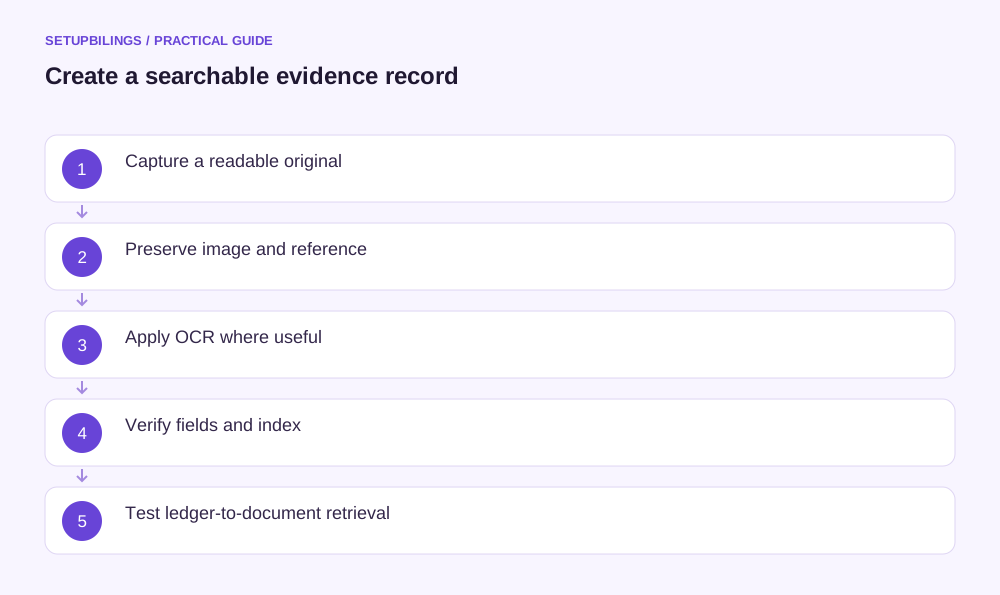
Turn paper receipts into searchable bookkeeping records by capturing a clear image, applying optical character recognition where useful, checking key details and linking the file to a document index and accounting entry. Searchability and accuracy are separate goals. A receipt can be easy to find while its recognised amount or supplier name is wrong.
Keep the original image as the evidence and use recognised text as an aid. Do not assume that scanning alone makes a document sufficient for every accounting, tax or retention purpose. Assess those requirements for the actual transaction and record type.
Prepare the receipt before capture
Flatten the paper, arrange all pages and remove obstructions without damaging the evidence. For a long receipt, capture the whole document at a readable scale rather than reducing it until the text disappears. Include the supplier, date, line items, total and relevant payment information.
Photograph in even light with the camera square to the page. Avoid glare, shadows, blur and cropped edges. Check the image immediately while the original is available; asking for a replacement a month later is much harder.
For an illustrative Pune field-service team, a technician captures a ₹2,760 parts receipt before leaving the supplier. The first image cuts off the date. Retaking it immediately avoids a later query that neither bank narration nor memory can reliably resolve.
Preserve the original and create a working copy
Store the unaltered capture with a unique internal reference. If rotation, cropping or contrast adjustment improves readability, retain the original and identify the enhanced copy. Do not redraw missing characters or replace uncertain figures inside the image.
Use a file format and resolution suitable for the intended system and document. Test whether small print remains readable after compression and upload. A thumbnail that looks clear on a phone may fail when enlarged for review.
Keep related pages together in order. A second page containing the total or supplier identification is part of the evidence, not an optional attachment to be omitted because the first page appears complete.
Apply OCR as a search aid
OCR converts recognised image text into machine-readable text. A searchable PDF can contain both the page image and a separate text layer. Tesseract’s official documentation describes this output and explains how image quality, skew and other factors affect recognition.
Select language settings appropriate to the document where the chosen tool supports them. Mixed-language receipts, stylised print and tables may require more review. Do not infer that successful text extraction establishes the document’s authenticity or business purpose.
Search can fail even when the image is readable, because OCR may confuse similar characters or omit a line. A separate checked index provides another route to the document.
Check the fields that affect bookkeeping
Verify supplier, document date, invoice or receipt number, total amount, tax details where relevant and payment status against the image. Check the business purpose and project with the person who incurred the cost.
For the ₹2,760 receipt, OCR might read the amount as ₹2,160 or confuse a document number ending in 8 with B. If the entry relies on extracted text without review, the file may be searchable but the books wrong.
| Field | Why it needs review |
|---|---|
| Supplier | Identifies the counterparty and duplicate search |
| Date | Supports period and sequence checks |
| Document number | Links copies of the same transaction |
| Amount | Drives the entry and settlement comparison |
| Purpose or project | Supports classification and allocation |
Retain any uncertainty as a query. A bank payment matching the total is useful corroboration but does not establish every invoice detail.
Build a checked document index
Record the internal reference, verified date, supplier, amount, document type, file location, submission owner and entry reference. Keep the supplier’s document number as a separate field rather than replacing it with your internal identifier.
A practical example is internal reference EXP-0261 linked to supplier receipt 1847, amount ₹2,760, service job J-108 and the eventual ledger voucher. The file can then be found even if OCR does not recognise the supplier name.
Avoid storing sensitive details unnecessarily in filenames. An index with controlled access can hold information that does not belong in a widely visible folder name. Restrict access according to the business task.
Link documents without duplicating transactions
A photograph, scanned PDF and emailed supplier copy can all support one underlying bill. Mark them as copies under one reference. Do not post each file as a new expense.
If one receipt covers several projects, preserve one evidence record and link the documented allocation. If several receipts support one reimbursement, retain the individual references and a summary that reconciles to the payment.
Check the arithmetic of splits. Three receipts of ₹1,200, ₹850 and ₹710 total ₹2,760. The reimbursement summary should reconcile without replacing the underlying documents.
Keep a sample of difficult documents in the quality check, including long receipts and mixed print. Testing only clean supplier PDFs can overstate how dependable the full archive is.
Test search, retrieval and recovery
Ask another team member to locate a sample receipt by reference, supplier, date and amount. Confirm that the correct image opens and remains readable. Searchable text should help, while the index and accounting link provide dependable alternatives.
Test access after files are moved or renamed. A broken link weakens an otherwise well-organised archive. Maintain recoverable copies and test restoration according to the business’s chosen controls.
Paper scanning is successful when evidence remains readable, key facts are checked and the transaction can be traced from ledger to document. That combination saves retrieval time without allowing OCR convenience to replace accounting judgement.